I have roughly 20 years of photos sitting on a home fileserver. They span 2001 to 2020, shot on everything from a Minolta DiMAGE F100 to a Nikon D5100 to various iPhones over the years. A mix of 21,554 JPEGs and 29,860 Nikon RAW files (51,414 images total) organized in a Lightroom backup directory by year, month, and date. Most were shot handheld, many in a hurry. The kind of archive that accumulates when you take photos for two decades without ever going back to curate them.
The Lightroom catalog that once made sense of all this was long gone, lost to a drive migration somewhere around 2018. What remained was a directory tree of raw files with no organization beyond the date folders. No star ratings, no keywords, no collections. Just files. Thousands of them, some sideways, some crooked, all unlabeled.
I wanted to fix that. Not manually (I don't have a month to spend in Lightroom) but programmatically. The goals were straightforward: correct orientation issues, straighten crooked horizons, generate AI descriptions of every photo's content, and catalog the whole archive in a queryable database. The kind of batch processing job that would have been impractical five years ago but is now entirely doable with the right hardware and a weekend of scripting.
The Hardware
Two machines on the local network, each with a distinct role:
| Machine | Role | Key Specs |
|---|---|---|
| Fileserver | NAS / photo storage | 28TB RAID (/md0), 125GB RAM, NFS exports |
| GPU workstation | ML inference | AMD Ryzen AI Max+ 395, Radeon 8060S, 121GB RAM |
The fileserver is a straightforward storage box. The interesting machine is the GPU workstation running an AMD Strix Halo APU, specifically the AI Max+ 395 with its integrated Radeon 8060S. I've written about this chip before, and it continues to impress for inference workloads. The RDNA 3.5 integrated GPU shares system memory, giving it access to 65.2 GB of VRAM without the typical constraints of a discrete card. For a model like BLIP that needs maybe 2 GB, that's absurdly generous, but it means you never have to think about VRAM budgets, which is a luxury when you're iterating on a processing pipeline.
The fileserver already had NFS configured, exporting /md0 to the local subnet. One mount command on the GPU workstation and both machines could see the same filesystem:
sudo mount -t nfs fileserver.localnet:/md0 /md0
No file copying, no rsync scripts, no staging directories. The photos live on the NAS and get processed in-place over the network. Gigabit Ethernet introduces some I/O overhead (each 25 MB NEF file takes 200–300ms to read across the wire), but for an overnight batch job, the simplicity of a single shared filesystem is worth the throughput trade-off. If this were a recurring workflow, I'd invest in 10GbE, but for a one-time archive processing run, gigabit got it done.
The Software Stack
Everything runs in a Python virtual environment on the GPU workstation:
- PyTorch 2.9.1+rocm6.3: ML framework with AMD ROCm backend
-
BLIP (
Salesforce/blip-image-captioning-large): vision-language model for image captioning - OpenCV 4.13: horizon detection via Canny edge detection and Hough transforms
- rawpy 0.26.1: Nikon NEF/NRW decoding (wraps LibRaw)
- piexif: EXIF metadata extraction for JPEGs
- exiftool: EXIF extraction for RAW files (called as a subprocess)
- SQLite: metadata and results database
The gfx1151 Situation
If you've followed my previous posts on Strix Halo, you know the drill. The Radeon 8060S reports as gfx1151 in ROCm, which is newer than what PyTorch's ROCm wheels officially target. The fix is the same environment variable override:
export HSA_OVERRIDE_GFX_VERSION=11.0.0
This maps the GPU to a generic gfx11 target. In practice, it works without issues, with no compute errors and no performance penalties. ROCm 6.16 on this machine also reports amdgcn-amd-amdhsa--gfx11-generic as a supported ISA, which is likely why the override works cleanly. I've been running production workloads with this flag for months now without incident.
The Processing Pipeline
Each photo passes through five stages: EXIF extraction, orientation correction, horizon detection and straightening, AI captioning, and finally saving the corrected image and cataloging everything in SQLite.
EXIF Metadata Extraction
For JPEGs, piexif reads the embedded EXIF data directly; it's a pure Python library that parses the binary EXIF structure without needing any external dependencies. For NEF/NRW files, piexif can't handle Nikon's proprietary container format, so I shell out to exiftool with JSON output (exiftool -json -n <file>). The -n flag is important; it returns numeric values instead of human-readable strings, which makes downstream processing much cleaner.
The extracted fields cover the full gamut: camera make and model, lens, dates, exposure settings (shutter speed, aperture, ISO, focal length), flash, white balance, metering mode, GPS coordinates, and the original orientation tag.
EXIF data is notoriously inconsistent across two decades of cameras. I'll come back to this; it became a debugging story of its own.
Orientation Correction
The EXIF orientation tag (values 1 through 8) encodes how the camera was held when the photo was taken. A value of 1 means the image is right-side up. A value of 6 means the camera was rotated 90 degrees clockwise. Value 3 means 180 degrees. Some values encode horizontal or vertical flips. The full matrix looks like this:
ops = {
    2: [Image.FLIP_LEFT_RIGHT],
    3: [Image.ROTATE_180],
    4: [Image.FLIP_TOP_BOTTOM],
    5: [Image.FLIP_LEFT_RIGHT, Image.ROTATE_270],
    6: [Image.ROTATE_270],
    7: [Image.FLIP_LEFT_RIGHT, Image.ROTATE_90],
    8: [Image.ROTATE_90],
}
Out of the 51,411 successfully processed photos, 8,797 (17.1%) needed orientation correction. The majority came from the Nikon D5100 and iPhone 4, both of which set the orientation tag but don't bake the rotation into the pixel data itself. Without this correction, nearly one in five photos would display sideways or upside-down in any viewer that doesn't respect EXIF orientation.
Here's what that looks like in practice. The raw pixel data from this iPhone photo is stored sideways; the camera recorded an EXIF orientation tag of 6, meaning "rotate 90 degrees clockwise to display correctly." Any viewer that ignores that tag renders the image on its side:
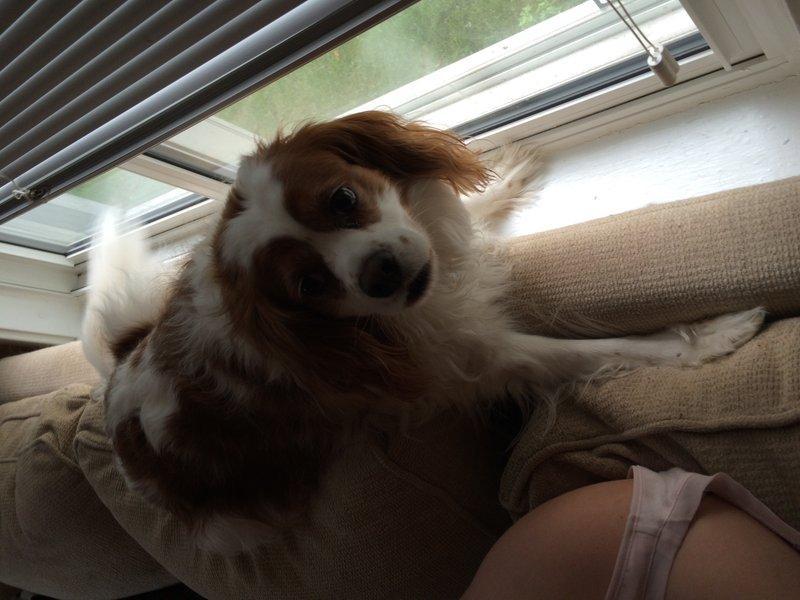
Before: raw pixel data (EXIF orientation 6, displayed sideways)
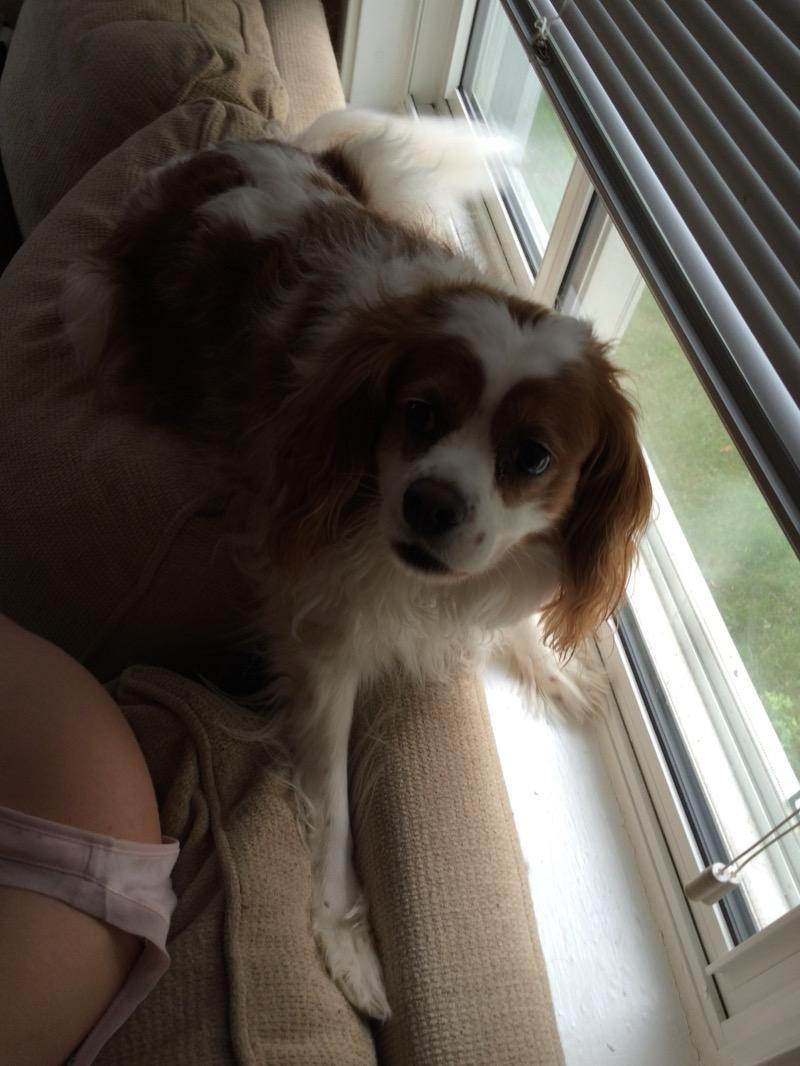
After: orientation corrected based on EXIF tag
Horizon Detection and Straightening
This stage uses classical computer vision, no neural network needed. The approach:
- Downscale the image to 1200px on the long side for speed
- Convert to grayscale, apply Gaussian blur
- Run Canny edge detection
- Crop to the vertical middle 50%, since the horizon is rarely at the extreme top or bottom of a frame
- Apply the Hough Line Transform to find line segments, requiring a minimum length of one-quarter the image width
- Filter to near-horizontal lines (within 20 degrees of level)
- Compute a weighted average of the detected angles, weighted by line length
The key is the threshold window. If the detected angle is less than 0.5 degrees, it's not worth correcting, since you'd introduce interpolation artifacts for no visible benefit. If it's greater than 15 degrees, it's probably not a tilted horizon at all; it's either intentional composition or the algorithm latching onto a staircase railing. The correction itself uses cv2.warpAffine with Lanczos interpolation and a reflective border mode, followed by an inward crop to eliminate any border artifacts:
crop_factor = 1.0 / (cos(angle) + sin(angle) * (min(h, w) / max(h, w)))
The initial implementation used Canny edge detection and Hough line transforms, classical CV techniques from the 1980s. Fast, deterministic, 100ms per image. But it had a fatal flaw: it couldn't distinguish between a tilted horizon and a roofline receding toward a vanishing point. Architecture, roads, staircases, any strong line in the middle band of the image would register as a "tilted horizon," and the algorithm would dutifully rotate the image to "correct" it. In practice, this meant a significant number of photos were being made worse, not better.
The fix was to replace Hough line detection with semantic segmentation. SegFormer (nvidia/segformer-b2-finetuned-ade-512-512), trained on the ADE20K dataset, segments each image into 150 classes, including sky. The approach is simple: find the sky pixels, trace the bottom edge of the sky region, fit a line to that boundary, and measure its angle. If there's no sky (less than 5% of the image), or the sky boundary is too fragmented (fewer than 20 points), skip the correction entirely.
This eliminates false positives on indoor shots, close-ups, architecture, and anything without a visible sky. SegFormer runs on CPU at about 0.4 seconds per image; the model is only 25M parameters, so it doesn't need the GPU. The GPU stays dedicated to BLIP captioning.
Two examples from the corrected archive. This bridge over a river had a 2.68-degree clockwise tilt, and the bridge deck and far shore are visibly leveled:
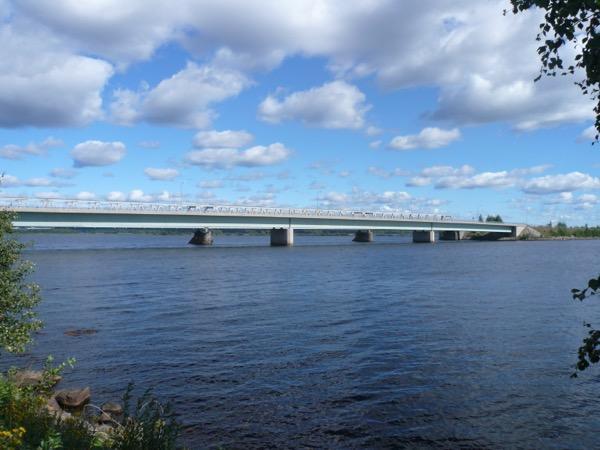
Before: 2.68° clockwise tilt
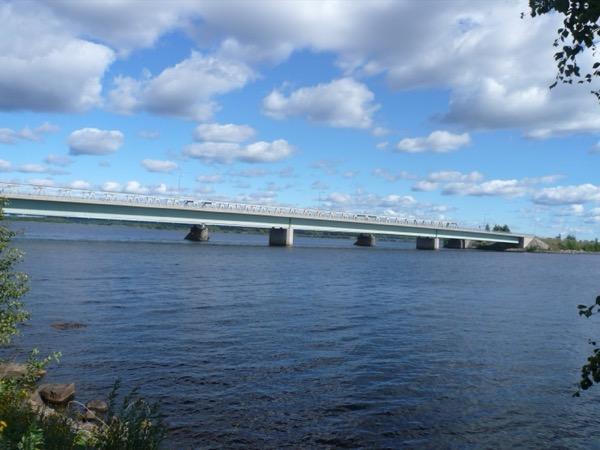
After: horizon straightened via sky boundary detection
This rocky Lake Superior shore had a 3.85-degree clockwise tilt, and the far horizon is leveled:
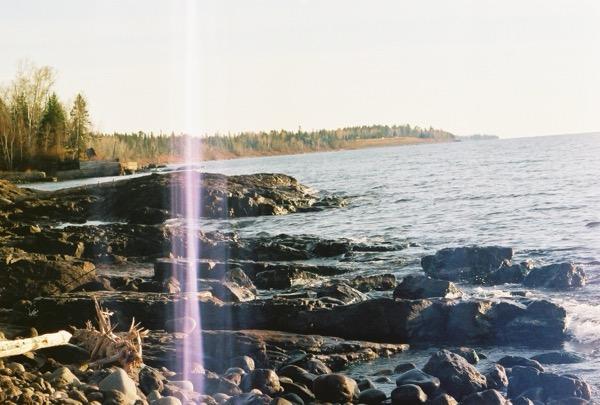
Before: 3.85° clockwise tilt
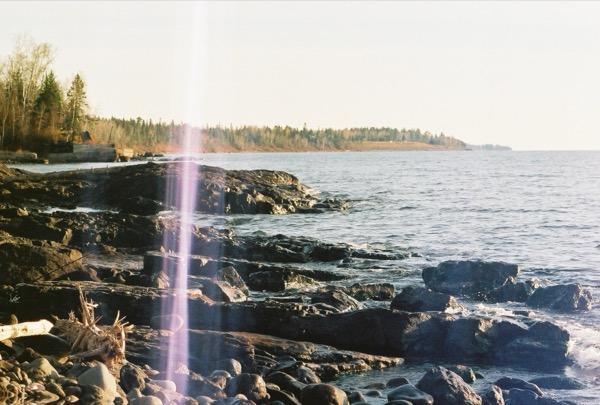
After: horizon straightened
AI Captioning with BLIP
The Salesforce/blip-image-captioning-large model generates natural language descriptions of each photo. It runs in float16 on the Radeon 8060S. Each image is resized to a maximum of 1024px before inference. Beam search with 5 beams and a 75-token limit generates the caption:
output_ids = model.generate(
    **inputs,
    max_new_tokens=75,
    num_beams=5,
    early_stopping=True,
)
Caption inference takes about 0.5–0.7 seconds per image, consistent regardless of whether the input was a JPEG or a decoded NEF. The model handles a wide variety of subjects surprisingly well. Some examples from the archive:
- "a brown and white dog standing next to a blue chair"
- "two silos sitting in the middle of a field"
- "a bird sitting on a branch of a tree"
- "a wooden sign that says hoban road in front of some trees"
- "a blurry photo of a car driving down a snowy road"
- "a dog being groomed by a woman in a salon"
The captions tend toward a "there is a..." pattern, and they occasionally get details wrong (BLIP once described a photo of my living room as "a hotel lobby," which is generous). But for searchability and cataloging purposes, they're remarkably useful. Being able to query WHERE caption LIKE '%dog%' across 51,000 photos and get meaningful results is something that would have required manual tagging before models like BLIP existed. For an archive this size, "good enough" captions on every photo are vastly more useful than perfect captions on none of them.
Save and Catalog
Corrected images are saved as high-quality JPEGs (quality 92) to /md0/photos_processed/images/, mirroring the original directory structure. NEF and NRW files are converted to JPEG in the process; the corrected archive is a uniform format. All metadata flows into a SQLite database with WAL journaling, tracking 40+ fields per photo: every piece of EXIF data, processing flags (was orientation corrected? was the horizon straightened? by how many degrees?), the AI caption, file hashes, dimensions, and processing timestamps.
The database makes the archive queryable in ways that were never possible before:
-- What cameras did I use, and when?
SELECT camera_model, MIN(date_taken), MAX(date_taken), COUNT(*)
FROM photos GROUP BY camera_model ORDER BY COUNT(*) DESC;

-- Photos with GPS data
SELECT filename, caption, gps_latitude, gps_longitude
FROM photos WHERE gps_latitude IS NOT NULL;

-- How crooked were my photos, by camera?
SELECT camera_model, ROUND(AVG(ABS(horizon_angle_degrees)), 2) as avg_tilt, COUNT(*)
FROM photos WHERE horizon_corrected = 1
GROUP BY camera_model ORDER BY avg_tilt DESC;
The EXIF Tuple Bug
The first processing pass completed 51,414 photos, but with 2,146 errors. All of them were TypeError: type tuple doesn't define __round__ method. For a pipeline that had been running cleanly on thousands of Nikon D5100 and D60 photos, this was unexpected.
The root cause turned out to be a two-part problem with how certain budget cameras from the 2008–2012 era write EXIF rational numbers.
Part 1: Malformed Tuples
The EXIF standard stores rational numbers as (numerator, denominator) pairs. Most cameras follow this. But some, particularly a batch of older point-and-shoots, wrote the ExposureBiasValue field as a 4-element tuple like (36, 0, 18, 0) instead of the expected 2-element (36, 0).
My _rational_to_float helper only handled 2-tuples:
def _rational_to_float(val):
    if isinstance(val, tuple) and len(val) == 2:
        if val[1] == 0:
            return None
        return val[0] / val[1]
    return val  # passes through 4-tuples as raw tuples
When a 4-tuple fell through, the downstream round() call choked on it. The fix was simple: return None for any tuple that isn't a standard rational pair.
Part 2: None Propagation
Even after fixing Part 1, many of these same cameras had written (36, 0), a rational with a zero denominator. The function correctly returned None for division by zero, but the calling code then did round(None, 2), triggering the same TypeError with a slightly different message.
The fix was a _safe_round wrapper:
def _safe_round(val, digits=1):
    if val is None:
        return None
    try:
        return round(val, digits)
    except TypeError:
        return None
After both fixes, the second pass recovered all 2,143 photos. The remaining 3 errors were genuine file corruption: a truncated JPEG, a NEF that LibRaw couldn't parse, and a NEF with filesystem-level I/O errors. Probably bad sectors on the source drive. Those can't be fixed in code.
This is one of those bugs that only surfaces at scale. Run the pipeline on a hundred Nikon photos and everything works perfectly. Run it on 51,000 photos spanning 15 different camera models over 20 years, and every edge case in the EXIF spec comes out to play. The lesson, which I should have internalized long ago: never trust external data formats at scale without defensive parsing on every field. The EXIF spec is a suggestion, not a contract, and camera manufacturers have been interpreting it creatively since the early 2000s.
Resumability
A 15-hour batch job will inevitably need to be restarted: bugs, system updates, a random hound disconnects the magsafe power cord from my MacBook Pro. The script tracks progress in SQLite and skips completed files on restart:
def is_already_processed(conn, source_path):
    row = conn.execute(
        "SELECT id FROM photos WHERE source_path = ? AND error IS NULL",
        (source_path,),
    ).fetchone()
    return row is not None
Photos that failed with errors are intentionally not skipped, so fixing a bug and re-running automatically retries them. This made the EXIF debugging cycle painless: fix the parser, clear the failed rows from the database, relaunch, and only the 2,143 affected photos get reprocessed.
Performance
The pipeline sustained 1.0–1.8 photos per second, depending on file format:
| Stage | Time per Photo |
|---|---|
| JPEG load | ~10ms |
| NEF decode (rawpy) | ~400ms |
| MD5 hash | ~5ms (JPEG), ~100ms (NEF) |
| Horizon detection | ~100ms |
| BLIP inference | ~500–700ms |
| JPEG save | ~50ms |
BLIP inference dominates the runtime. NEF decoding is the second bottleneck; each RAW file is 20–30 MB and requires full demosaicing through LibRaw. The NFS overhead for reading large NEFs over gigabit Ethernet is noticeable but not the primary constraint.
Total wall time: 15.5 hours across two passes for 51,414 photos. The BLIP model uses roughly 2 GB of the 65.2 GB available VRAM on the Strix Halo. Memory was never a concern.
Final Results
| Metric | Count | Percentage |
|---|---|---|
| Total photos | 51,414 | 100% |
| Successfully processed | 51,411 | 99.99% |
| Orientation corrected | 8,797 | 17.1% |
| Horizon straightened | 15,251 | 29.7% |
| AI captioned | 51,411 | 99.99% |
| Unrecoverable errors | 3 | 0.006% |
The top cameras in the archive tell the story of 20 years of gear:
| Camera | Photos |
|---|---|
| Nikon D5100 | 24,073 |
| Nikon D60 | 8,734 |
| iPhone 4 | 2,664 |
| Nikon D3100 | 1,698 |
| Panasonic DMC-FX07 | 975 |
| Minolta DiMAGE F100 | 870 |
| iPad | 803 |
| iPhone 5s | 698 |
| Samsung SCH-I500 | 645 |
The output lives on the NAS:
-
Corrected images:
/md0/photos_processed/images/, 51,411 JPEGs preserving the original year/month/date folder structure, all NEFs converted, all orientation and horizon corrections applied. -
SQLite database:
/md0/photos_processed/photos.db, 40+ fields per photo with full EXIF metadata, processing results, and AI-generated captions. -
Processing log:
/md0/photos_processed/processing.log, timestamped record of the entire run.
Takeaways
AMD's Strix Halo continues to earn its keep for ML inference. The HSA_OVERRIDE_GFX_VERSION=11.0.0 workaround remains necessary, but once set, PyTorch and ROCm run without complaints. The 65 GB shared VRAM pool means you can load models without thinking about memory budgets, a workflow advantage that's easy to underestimate until you've experienced it.
Classical computer vision still has its place. The horizon detection pipeline uses Canny edge detection and Hough transforms, techniques from the 1980s. No training data, no GPU needed, deterministic results, and the whole thing runs in 100ms per image. For geometric corrections on photographic images, you don't need a neural network. You need line detection.
EXIF is a minefield. Twenty years of cameras from different manufacturers means every edge case in the spec gets exercised. Tuple lengths vary, denominators are zero, fields are missing or repurposed. If you're parsing EXIF at scale, assume nothing about the data's shape and validate everything.
Resumability is non-negotiable for long-running jobs. Tracking progress in the database and skipping completed work made it trivial to iterate on bugs. Without this, every fix would mean reprocessing 51,000 photos from scratch.
NFS over gigabit is fine for batch processing. Not optimal, but for an overnight job, the network overhead from NAS-attached storage is acceptable. The real bottleneck was ML inference at 0.6 seconds per photo. If I were doing this regularly, 10GbE would be worth the upgrade, but for a one-time archive processing run, gigabit got the job done.
The whole project, from first SSH to final database entry, took about a day of wall time, most of which was unattended processing. The scripting itself was maybe three hours of work. Twenty years of photos, cataloged and corrected overnight. Not bad for a Strix Halo and some Python. The full source is available on GitHub.
What I didn't expect was how useful the database would be after the fact. Being able to ask "show me every photo I took with the D5100 at ISO 3200 or higher" or "find photos with GPS data from 2015" turns a pile of files into something that actually tells a story. The AI captions add another dimension; I can now search my own photo archive by content, not just metadata. It's the kind of capability that makes you wonder why photo management software hasn't done this for years. The models have been available. The hardware has been affordable. Someone just needed to wire it together.