There's something magical about watching a 45-year-old operating system boot on modern hardware. CP/M 2.2, the operating system that launched a thousand microcomputers and paved the way for MS-DOS, still has lessons to teach us about elegant system design.
This post documents my journey getting CP/M 2.2 running on the RetroShield Z80 emulator, a Rust-based Z80 emulator I've been developing. The result is a fully functional CP/M system that can run classic software like Zork and WordStar.
What is CP/M?
CP/M (Control Program for Microcomputers) was created by Gary Kildall at Digital Research in 1974. It became the dominant operating system for 8-bit microcomputers in the late 1970s and early 1980s, running on machines like the Altair 8800, IMSAI 8080, Osborne 1, and Kaypro.
CP/M's genius was its portability. The system separated into three layers:
- CCP (Console Command Processor) - The command line interface
- BDOS (Basic Disk Operating System) - File and I/O services
- BIOS (Basic Input/Output System) - Hardware abstraction
Only the BIOS needed to be rewritten for each machine. This architecture directly influenced MS-DOS and, by extension, every PC operating system that followed.
The RetroShield Z80 Emulator
The RetroShield is a hardware shield that lets you run vintage CPUs on modern microcontrollers. My emulator takes this concept further by providing a complete software simulation of the Z80 and its peripherals.
The emulator includes:
- Full Z80 CPU emulation (via the
rz80crate) - MC6850 ACIA serial port (console I/O)
- SD card emulation with DMA block transfers
- TUI debugger with memory viewer, disassembly, and single-stepping
The Challenge: Disk I/O
Getting CP/M's console I/O working was straightforward. The real challenge was disk I/O. CP/M expects to read and write 128-byte sectors from floppy disks. I needed to emulate this using files on the host system.
The standard 8" single-sided, single-density floppy format that CP/M uses:
- 77 tracks
- 26 sectors per track
- 128 bytes per sector
- 256KB total capacity
DMA Block Transfers
Rather than transferring bytes one at a time through I/O ports (which would be painfully slow), I implemented DMA block transfers. The BIOS sets up a DMA address and issues a single command to transfer an entire 128-byte sector:
; Set DMA address
ld      hl, (DMAADR)
ld      a, l
out     (SD_DMA_LO), a
ld      a, h
out     (SD_DMA_HI), a

; Issue block read
xor     a
out     (SD_BLOCK), a

; Check status
in      a, (SD_BLOCK)
ret                     ; A = 0 if OK
On the emulator side, this triggers a direct memory copy from the disk image file into emulated RAM.
The Bug That Almost Defeated Me
After implementing everything, CP/M would boot and print its banner, but then hang or show garbage. The debug output revealed the BDOS was requesting insane track numbers like 0x0083 instead of track 2.
The culprit? A classic use-after-move bug in the BIOS:
SELDSK:
    ; Calculate DPH address in HL
    ld      l, c
    ld      h, 0
    add     hl, hl          ; *16
    add     hl, hl
    add     hl, hl
    add     hl, hl
    ld      de, DPH0
    add     hl, de

    call    OPENDISK        ; BUG: This overwrites HL!
    ret                     ; Returns garbage instead of DPH
The OPENDISK subroutine was using HL internally, destroying the Disk Parameter Header address that SELDSK was supposed to return. The BDOS would then read garbage from the wrong memory location for its disk parameters.
The fix was simple:
    push    hl
    call    OPENDISK
    pop     hl              ; Restore DPH address
    ret
24-bit Seek Positions
Another issue: the disk images are 256KB, but I initially only supported 16-bit seek positions (64KB max). I added an extended seek port for the high byte:
pub const SD_SEEK_LO: u8 = 0x14;    // Bits 0-7
pub const SD_SEEK_HI: u8 = 0x15;    // Bits 8-15
pub const SD_SEEK_EX: u8 = 0x19;    // Bits 16-23
The Memory Map
CP/M's memory layout for a 56KB TPA (Transient Program Area):
0000-00FF   Page Zero (jump vectors, FCB, command buffer)
0100-DFFF   TPA - User programs load here (56KB)
E000-E7FF   CCP - Console Command Processor
E800-F5FF   BDOS - Basic Disk Operating System
F600-FFFF   BIOS - Hardware abstraction layer
The BIOS is only about 1KB of Z80 assembly, handling:
- Console I/O via the MC6850 ACIA
- Disk I/O via SD card emulation
- Drive selection and track/sector positioning
Running Classic Software
With CP/M booting successfully, I could run classic software:
Zork I - Infocom's legendary text adventure runs perfectly:
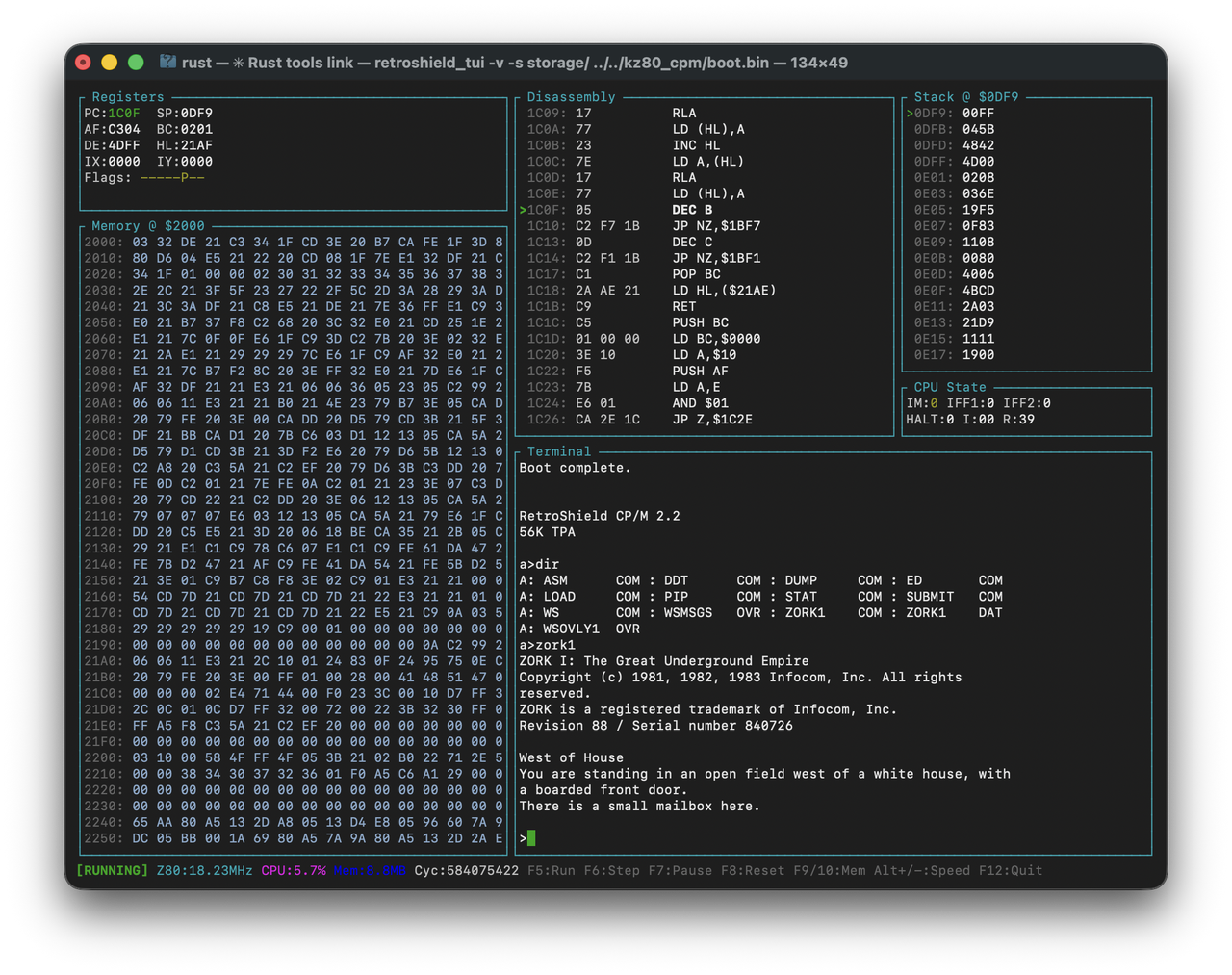
WordStar 3.3 and SuperCalc also run, though they need terminal escape codes configured properly (the Kaypro version uses ADM-3A codes).
Try It Yourself
The code is available on GitHub:
- RetroShield Z80 Emulator - The Rust emulator with SD card DMA support
- RetroShield CP/M - BIOS, boot loader, and CP/M system files
To run:
cd emulator/rust
cargo build --release
./target/release/retroshield_tui -s storage path/to/boot.bin
Press F5 to run, then type zork1 at the A> prompt.
Lessons Learned
Building this system reinforced some timeless principles:
-
Abstraction layers work. CP/M's BIOS/BDOS/CCP split made porting trivial. Only 1KB of code needed to be written for a completely new "hardware" platform.
-
Debug output is essential. Adding hex dumps of track/sector values immediately revealed the SELDSK bug.
-
Read the documentation. The CP/M 2.2 System Alteration Guide is remarkably well-written and explained exactly what the BIOS functions needed to do.
-
Old code still runs. With the right emulation layer, 45-year-old binaries execute flawlessly. The Z80 instruction set is eternal.
There's a certain satisfaction in seeing that A> prompt appear. It's the same prompt that greeted users in 1977, now running on code I wrote in 2025. The machines change, but the software endures.