RetroShield Z80 Projects
RetroShield Z80 Projects
A collection of software tools, language interpreters, compilers, and development utilities for the RetroShield Z80 platform.
About the RetroShield
The RetroShield is a hardware platform created by Erturk Kocalar that allows vintage microprocessors like the Z80, 6502, and 6809 to run on modern Arduino boards. The Z80 variant provides a real Zilog Z80 CPU connected to an Arduino Mega or Teensy, which emulates RAM, ROM, and I/O peripherals. This unique architecture lets you run authentic Z80 code on real silicon while leveraging modern USB connectivity and the Arduino ecosystem for development.
The RetroShield hardware is open source and available for purchase on Tindie. The Teensy adapter provides significantly more RAM (256KB vs ~4KB), enabling more ambitious projects.
The Projects
RetroLang - A Systems Programming Language
RetroLang is a custom systems programming language and compiler designed specifically for Z80 microprocessors. It features Pascal/C-like syntax that compiles directly to Z80 assembly.
Features:
- Pascal/C-like syntax that's easy to read and write
- Compiles directly to Z80 assembly
- Built-in serial I/O for RetroShield
- Functions with recursion
- 16-bit integers and 8-bit bytes
- Arrays and pointers
- Inline assembly escape hatch
Example - Factorial:
func factorial(n: int): int
    if n <= 1 then
        return 1;
    else
        return n * factorial(n - 1);
    end;
end;

proc main()
    var i: int;

    print("Factorials:");
    println();

    for i := 1 to 8 do
        printi(i);
        print("! = ");
        printi(factorial(i));
        println();
    end;
end;
Installation:
cargo install retrolang retrolang-asm
Related Crates:
- retrolang - The compiler
- retrolang-asm - Z80 assembler (forked from FantASM by Guy Black)
- retrolang-math - Expression evaluator
- retrolang-bin2c - Convert binaries to C arrays for Arduino
Fortran 77 Interpreter
kz80_fortran is a Fortran 77 subset interpreter written in C and cross-compiled with SDCC. It runs natively on the Z80 and provides an interactive REPL with program entry mode.
Requires the Teensy adapter (~8KB RAM needed).
Features:
- Free-format source input (no column requirements)
- REAL numbers via BCD floating point (8 significant digits)
- Block IF/THEN/ELSE/ENDIF statements
- DO loops with optional step
- 1D arrays
- SUBROUTINE and FUNCTION support
- Intrinsic functions: ABS, MOD, INT, REAL, SQRT
Supported Statements:
| Statement | Example |
|---|---|
| PROGRAM/END |
PROGRAM HELLO ... END
|
| INTEGER/REAL |
INTEGER I, J / REAL X, Y
|
| DIMENSION | DIMENSION ARR(10) |
| IF/THEN/ELSE/ENDIF |
IF (X .GT. 0) THEN ... ENDIF
|
| DO/CONTINUE |
DO 10 I = 1, 10, 2 ... 10 CONTINUE
|
| WRITE/READ | WRITE(*,*) 'Hello', X |
| SUBROUTINE/FUNCTION | Full subprogram support |
| CALL/RETURN | CALL MYSUB(A, B) |
Example:
PROGRAM AVERAGE
  INTEGER I, N
  REAL SUM, AVG, X

  WRITE(*,*) 'HOW MANY NUMBERS?'
  READ(*,*) N

  SUM = 0.0
  DO 10 I = 1, N
    WRITE(*,*) 'ENTER NUMBER', I
    READ(*,*) X
    SUM = SUM + X
10 CONTINUE

  AVG = SUM / REAL(N)
  WRITE(*,*) 'AVERAGE =', AVG
END
The interpreter includes a comprehensive test suite with 193+ unit tests covering BCD math, lexer, parser, symbol table, and program control flow.
Retro Pascal Interpreter
kz80_pascal is a minimal Pascal interpreter that runs natively on the Z80. Currently in active development with expression evaluation mode working.
Features:
- Native Z80 Pascal interpreter
- MC6850 ACIA serial I/O
- Interactive expression evaluation mode
- Integer and boolean arithmetic
- Floating point support (experimental)
Current Status (v0.1.3):
Retro Pascal v0.1.3
For RetroShield Z80
(Expression Eval Mode)

> 2 + 3
5
> 10 * 4 + 2
42
> TRUE AND FALSE
FALSE
Implemented:
- Integer literals and arithmetic:
+,-,*,DIV,MOD - Boolean literals:
TRUE,FALSE - Boolean operators:
AND,OR,NOT - Comparison operators:
=,<>,<,>,<=,>= - Parenthesized expressions
- Unary minus
Planned:
-
PROGRAM,VAR,BEGIN/END - Types:
INTEGER,BOOLEAN,CHAR - Statements:
:=,IF/THEN/ELSE,WHILE/DO,FOR/TO/DO - I/O:
WRITE,WRITELN,READ,READLN -
PROCEDUREdeclarations
RetroShield Z80 Emulator
A Z80 emulator for testing RetroShield firmware on your development machine, available in both C and Rust implementations.
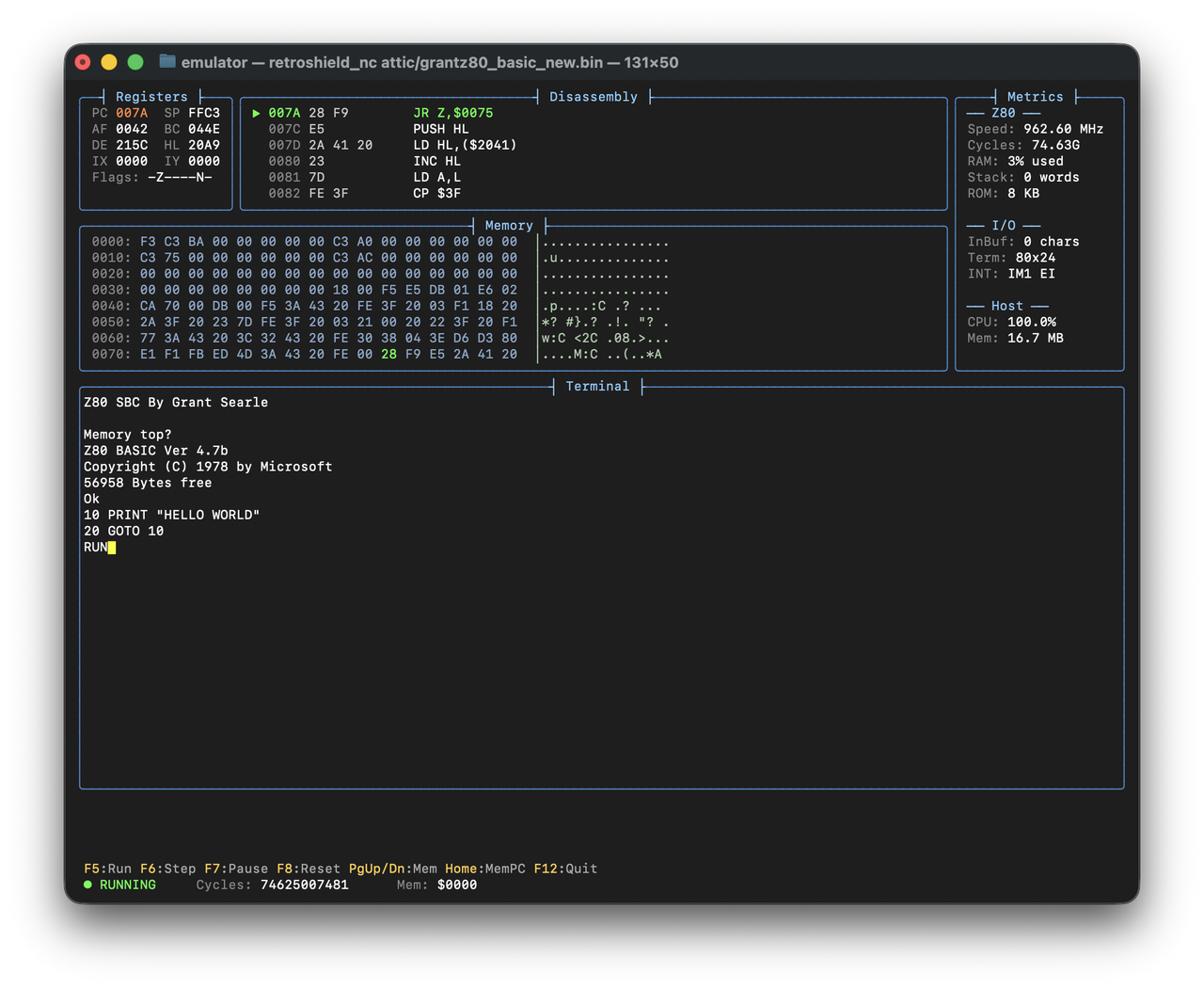
Features:
- Cycle-accurate Z80 emulation
- Dual serial chip emulation:
- MC6850 ACIA (ports $80/$81) - used by MINT, Firth, Monty, Retro Pascal
- Intel 8251 USART (ports $00/$01) - used by Grant's BASIC, EFEX
- Two emulator modes:
- Simple passthrough (stdin/stdout)
- Full TUI debugger with registers, disassembly, memory view
C Implementation
Uses the superzazu/z80 library and notcurses for the TUI.
# Build
make

# Run with TUI
./retroshield_nc rom.bin
Rust Implementation
Uses the rz80 crate and ratatui for the TUI.
# Build
cargo build --release

# Run with TUI
./target/release/retroshield_tui rom.bin
TUI Controls:
| Key | Action |
|---|---|
| F5 | Run continuously |
| F6 | Step one instruction |
| F7 | Pause execution |
| F8 | Reset CPU |
| F9/F10 | Memory view scroll |
| F12 | Quit |
TUI Layout:
┌─ Registers ─────────┬─ Disassembly ──────────┬─ Stack ─────────┐
│ PC:0075  SP:FFC2    │ >0075: LD A,($2043)    │>FFC2: 0075      │
│ AF:0042  BC:010D    │  0078: CP $00          │ FFC4: 0120      │
│ DE:215C  HL:20A6    │  007A: JR Z,$0075      │ FFC6: 0000      │
│ IX:0000  IY:0000    │                        ├─ CPU State ─────┤
│ Flags: -Z----N-     │                        │ IM:1 IFF1:1     │
├─ Memory @ $2000 ────┤                        │ HALT:0 I:00 R:7F│
│ 2000: 00 0D 50 52...├────────────────────────┴─────────────────┤
│ 2010: 57 20 57 4F...│ Terminal                                 │
│ ...                 │ Z80 BASIC Ver 4.7b                       │
│                     │ Ok                                       │
└─────────────────────┴──────────────────────────────────────────┘
[RUNNING] Z80:31.16MHz CPU:5.8% Mem:8.5MB F5:Run F6:Step F12:Quit
Tools and Utilities
bin2c (retrolang-bin2c)
A utility to convert Z80 binary ROMs to C arrays for inclusion in Arduino sketches. This is useful for embedding ROM images in the Arduino flash memory using PROGMEM.
cargo install retrolang-bin2c

# Convert ROM to C header with PROGMEM attribute
bin2c rom.bin -o rom.h --progmem --uint8

# Output:
# #ifndef ROM_H
# #define ROM_H
# #include <avr/pgmspace.h>
# const uint8_t rom[] PROGMEM = {
#     0x00, 0x01, 0x02, ...
# };
# #define ROM_SIZE 8192
# #endif
Architecture Overview
How It All Fits Together
┌─────────────────────────────────────────────────────────────────┐
│                    Development Machine                          │
├─────────────────────────────────────────────────────────────────┤
│  ┌───────────────┐    ┌───────────────┐    ┌───────────────┐   │
│  │   RetroLang   │    │  retrolang-   │    │    bin2c      │   │
│  │   Compiler    │───▶│     asm       │───▶│   (optional)  │   │
│  │    (.rl)      │    │    (.asm)     │    │     (.h)      │   │
│  └───────────────┘    └───────────────┘    └───────────────┘   │
│         │                    │                    │             │
│         │                    ▼                    │             │
│         │             ┌───────────┐               │             │
│         │             │   .bin    │               │             │
│         │             │   ROM     │               │             │
│         │             └───────────┘               │             │
│         │                    │                    │             │
│         ▼                    ▼                    ▼             │
│  ┌─────────────────────────────────────────────────────────┐   │
│  │               RetroShield Z80 Emulator                   │   │
│  │         (Test and debug before hardware)                 │   │
│  └─────────────────────────────────────────────────────────┘   │
└─────────────────────────────────────────────────────────────────┘
                               │
                               ▼
┌─────────────────────────────────────────────────────────────────┐
│                    RetroShield Hardware                         │
├─────────────────────────────────────────────────────────────────┤
│  ┌───────────────┐    ┌───────────────┐    ┌───────────────┐   │
│  │   Arduino     │◀──▶│   Z80 CPU     │◀──▶│   Serial      │   │
│  │ Mega/Teensy   │    │   (Real!)     │    │   Terminal    │   │
│  │ (ROM/RAM/IO)  │    │               │    │               │   │
│  └───────────────┘    └───────────────┘    └───────────────┘   │
└─────────────────────────────────────────────────────────────────┘
Memory Map
The standard RetroShield Z80 memory layout:
| Address Range | Size | Description |
|---|---|---|
$0000-$1FFF |
8KB | ROM (program code) |
$2000-$7FFF |
24KB | RAM |
$8000-$FFFF |
32KB | Extended RAM (Teensy only) |
I/O Ports
Two serial chip configurations are supported:
MC6850 ACIA (ports $80/$81)
Used by kz80_forth, kz80_pascal, RetroLang (default), MINT, Firth, Monty.
| Port | Read | Write |
|---|---|---|
| $80 | Status register | Control register |
| $81 | Receive data | Transmit data |
Intel 8251 USART (ports $00/$01)
Used by original RetroShield sketches, Grant Searle's BASIC, EFEX.
| Port | Read | Write |
|---|---|---|
| $00 | Receive data | Transmit data |
| $01 | Status register | Mode/Command register |
Getting Started
Quick Start with RetroLang
-
Install the toolchain:
bash cargo install retrolang retrolang-asm -
Write a program (
hello.rl):proc main() print("Hello, RetroShield!"); println(); end; -
Compile to binary:
bash retrolang hello.rl --binary -
Test with the emulator (if installed):
bash ./retroshield hello.bin -
Load on hardware:
- Use bin2c to create a C header
- Include in your Arduino sketch
- Upload to RetroShield
Building the Emulators
C Emulator:
cd emulator
brew install notcurses  # or apt-get install libnotcurses-dev
make
Rust Emulator:
cd emulator/rust
cargo build --release
Source Code
All projects are open source and available on GitHub/GitLab:
- retroshield-arduino - Main repository with all projects
- retrolang - RetroLang compiler
- retrolang-asm - Z80 assembler
- retrolang-math - Expression evaluator
- retroshield-hw - RetroShield hardware design by Erturk Kocalar
Acknowledgments
- Erturk Kocalar - Creator of the RetroShield hardware platform
- Guy Black - Original author of FantASM assembler
- Grant Searle - Z80 BASIC and reference designs
- superzazu - Z80 emulation library
License
All projects are released under open source licenses (BSD 3-Clause or MIT). See individual project repositories for details.